ENRICH
Table Data Enrichment
The enrichment function, known from Allevo, is also available in Kyra Stream. Here, the fields of the Source are automatically mapped to the corresponding fields of the Target. Via a key comparison, values can be retrieved from any table and also transferred to the Target.
An example could be Cost Center Texts that are to be transferred to the Target depending on the logon language and the Cost Center Number.
Source Selection Tab
In this tab, you define which table is to be read and with which criteria entries are to be found.
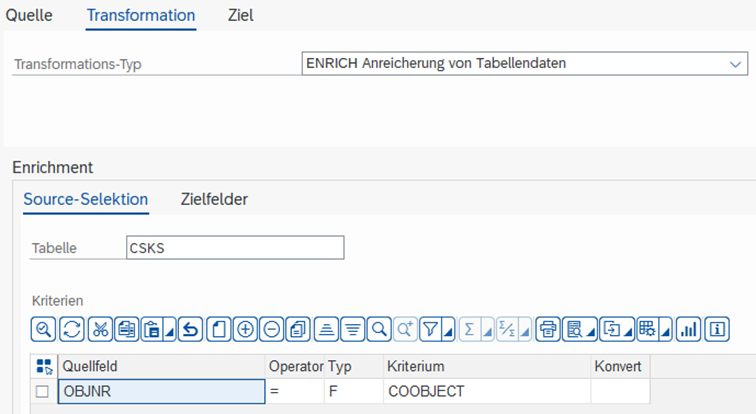
| Table | Source Table, from which the data is to be read. For Satellites and SunTables, the corresponding Groundtable must be specified. |
|---|---|
| Criteria | Criteria by which the data is to be selected. These are usually the Key Fields of the corresponding Source Table. |
Target Fields Tab
In this tab, you define which field from the table (Source) is mapped to the field in the Target (Target Field). If required, a formula can also be applied and a Pattern can be used.
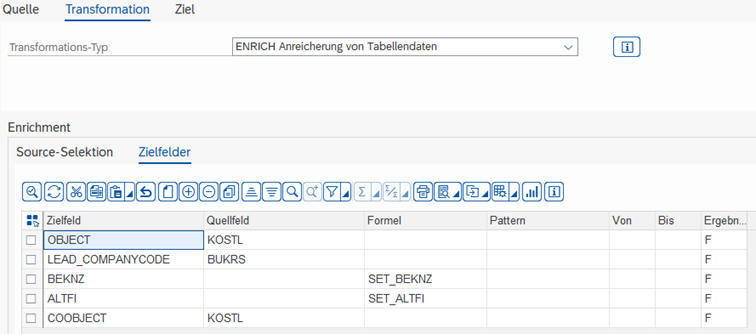
| Target Field | Field that is to be changed in the Target. |
|---|---|
| Source Field | Field from the Source Table with which the Target Field is to be filled. |
| Formula | With F4, you can select an already created formula. With SHIFT+F2, you enter the Formula Editor to change a selected formula or create a new one. |
| Pattern | With the help of a Pattern, several numbered fields can be filled with the same formula or the same Source Field. Example: You use Pattern MONTH. In the Target Field, VALUE(MONTH) can now be entered, for example, to change fields VALUE01 to VALUE12. |
| From/To | From which value to which value the Pattern should run. In the example, 1 to 12. |