UNI
Universal Tables
A central data source in Kyra Stream are the Universal Tables. Unlike the normally used, customer-specific Groundtables, Universal Tables do not need to be created via a transport in the SAP system. Instead, they are virtual tables that are configured via the "Setup" button and are then immediately ready for use.
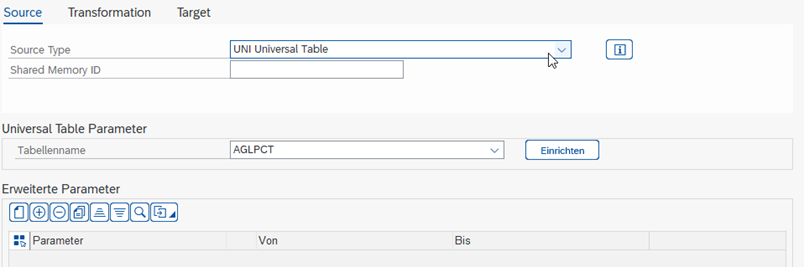
Parameters
| Parameter | Description |
|---|---|
| Table Name | Universal Table from which data should be read |
| Advanced Parameters | Data can be filtered when reading via the selected fields |
Concept
Universal Tables operate according to the principle of Entity, Attribute, Value (EAV). The data is not stored in separate tables, but in a central table. This makes it possible to create tables within the Kyra Stream context without having to first create and transport them in SAP using transaction SE11.
Normally, tables must first be created and transported in SAP before they can be used. These tables have a fixed structure. With EAV, the table is, simplified, resolved into entities and attributes.
Conventional Table
| Row | Cost Center | Investment | Costs | Date |
|---|---|---|---|---|
| 1 | 1000 | Car | 30,000 | 01.05.2024 |
| 2 | 1200 | Machine | 100,000 | 01.08.2024 |
EAV Table
| Entity | Attribute | Value |
|---|---|---|
| 1 | Cost Center | 1000 |
| 1 | Investment | Car |
| 1 | Costs | 30,000 |
| 1 | Date | 01.05.2024 |
| 2 | Cost Center | 1200 |
| 2 | Investment | Machine |
| 2 | Costs | 100,000 |
| 2 | Date | 01.08.2024 |
Kyra Stream automatically converts the data during the execution of the Process, so that the end user can largely use the table like a normal SAP table. This conversion costs performance, which can have a negative impact with large data volumes in older SAP systems.
Therefore, in systems without S/4HANA, Universal Tables are only suitable for
- Storage of parameters
- Storage of smaller data volumes
- Sketching of Groundtables
If Kyra Stream is used in an S/4HANA environment, it should first be checked in the implementation project whether the data volumes are read and written with sufficient performance.
Setup of Universal Tables
The maintenance of Universal Tables is done via the "Setup" button. This is located on the "Source" tab, once "Source Type" has been selected, see figure: Source Type UNI. The maintenance view is based on the ABAP Dictionary (transaction SE11).
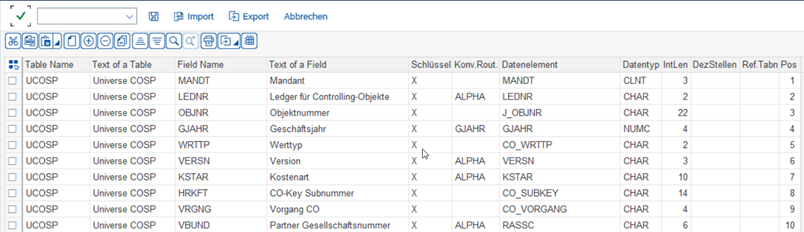
Further Parameters
| Parameter | Description |
|---|---|
| Table Name | Table name used in the Source or Target |
| Table Description | Description of the table |
| Field Name | Field name |
| Field Description | Description of the field |
| Key | Is the field a key field? The combination of all key fields can occur only once |
| Conv. Rout. | Which conversion exit should be used for the field |
| Data Element | Data element from SAP. Data elements have predefined data types, field lengths, decimal places, and descriptions |
| Data Type | Data type |
| Length | Character length of the field |
| Decimal Places | Number of decimal places of the field |
| Ref. Table Name | Comment field, SAP table in which the field is used |
| Position | Position of the field within the Universal Table |
The settings can be exported and imported via the corresponding buttons to use the settings in another system.
Universal Table as Data Structure
A Shared Memory always requires a data structure of a Target. Sometimes, during the runtime of the Process, more fields are needed than the Target actually has in the database. Here, the Universal Table can be used only as a data structure, without the data actually being physically stored in the Universal Table afterwards.